

VPN on Android step by step guide (Using OpenVPN)
This instruction describes how to connect a VPN Gate Relay VPN Server by using OpenVPN Connect. OpenVPN Connect is an OpenVPN Client for Android.Developer: OpenVPN Technologies, Inc.
On this instruction, every screen-shots are taken on Android 4.x. Other versions of Android 4.x are similar to be configured, however there might be minor different on UIs.
These screen-shots are in English version of Android. If you use other language, you can still configure it easily by referring the following instructions.
- In Android, L2TP/IPsec is very easy to use.
OpenVPN VPN Client software is built-in on Android. L2TP is easier to be configured than OpenVPN. We recommend to try L2TP/IPsec before trying OpenVPN. Some firewalls may filter L2TP/IPsec packets. In such a network, you should use OpenVPN.
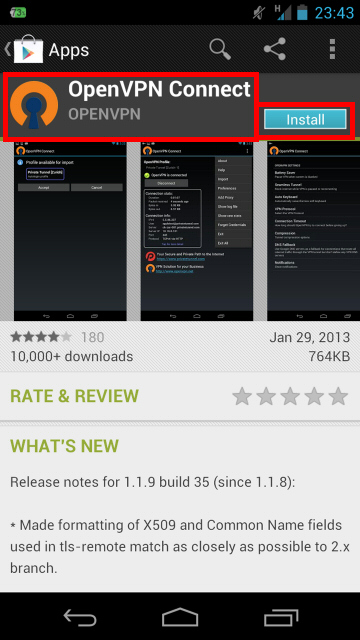
1. Install OpenVPN Connect (only once for the first time)
Start "Google Play Store" , search "OpenVPN Connect" application and download it.- If you are browsing this web site on Android, Click Here to install it.

2. Download and install a connection setting file (.ovpn file) of OpenVPN (only once at the first time)
You have to download an OpenVPN connection setting file (.ovpn) in order to connect to a VPN Gate Public VPN Relay Server by using OpenVPN.- OpenVPN connection setting files are downloadable on the Public VPN Relay Servers List page.
You can also open the Public VPN Relay Servers List page in your PC, download a .ovpn file, attach it on an e-mail and send it to Android.


3. Connect a VPN
To connect a VPN connection, start OpenVPN Connect, select an imported .ovpn file, and tap the "Connect" button.After the VPN is established, the "Connected" status will be displayed as follow
4. Enjoy Internet via VPN relaying
While VPN is established, all communications towards the Internet will be relayed via the VPN Server.You can visit the VPN Gate Top Page to see your current global IP address. You can see your source country or region has been changed to other if you are connecting to a VPN server which is located on oversea country.

Enjoy YouTube, Facebook or Twitter while your VPN connection is established.
Facebook, Twitter and Gmail uses HTTPS (SSL) encrypted communication protocols. Regardless of VPN or non-VPN, no one can tap these encrypted communications.
Any errors using OpenVPN?
- Make sure that the destination hostname or IP address are correct, viewing the VPN Servers List page.
- If the hostname and IP address data on the .ovpn file you imported become too old, you have to download the latest .ovpn file again.
- In some countries or regions, specifying DDNS Hostname (.opengw.net) might fail. In such an environment, specify the IP address directly instead of DDNS hostname.
- Your local firewall might filter any OpenVPN packets. In such a network, OpenVPN cannot be used. If you use Windows, try Using SoftEther VPN Client. Mac, iOS or Android, try L2TP/IPsec.


0 Comments